Why turnover fails even when everyone is working.
Cleaning, linen, inventory, damage checks and small repairs compete for the same short window. The failure is often not a missing message but an unclear state: nobody can prove what is complete or what blocks the next arrival.
A group message does not establish one accountable owner and deadline.
Staff receives an address but not the departure time, special setup, property notes or next arrival.
Photos and damage reports become detached from the stay and hard to retrieve.
A missing key, broken appliance or linen delay is discovered only when the guest is close.
“Done” can mean the cleaner left, not that the property passed the agreed standard.
A complete workflow from departure to ready status.
The task should inherit context from the calendar while still allowing a manager to handle exceptions and review the result.
Departure detected
The correct property, checkout time and next arrival create the turnover window.
Work assigned
One person or team receives the deadline, priority, access and property-specific instructions.
Checklist completed
Cleaning, linen, supplies, safety and setup steps are confirmed from a mobile view.
Issue escalated
Damage, missing stock or maintenance creates a separate owned task instead of hiding in a photo caption.
Property verified
Completion, evidence and unresolved exceptions determine whether the unit is ready for check-in.
What cleaning and staff software should provide.
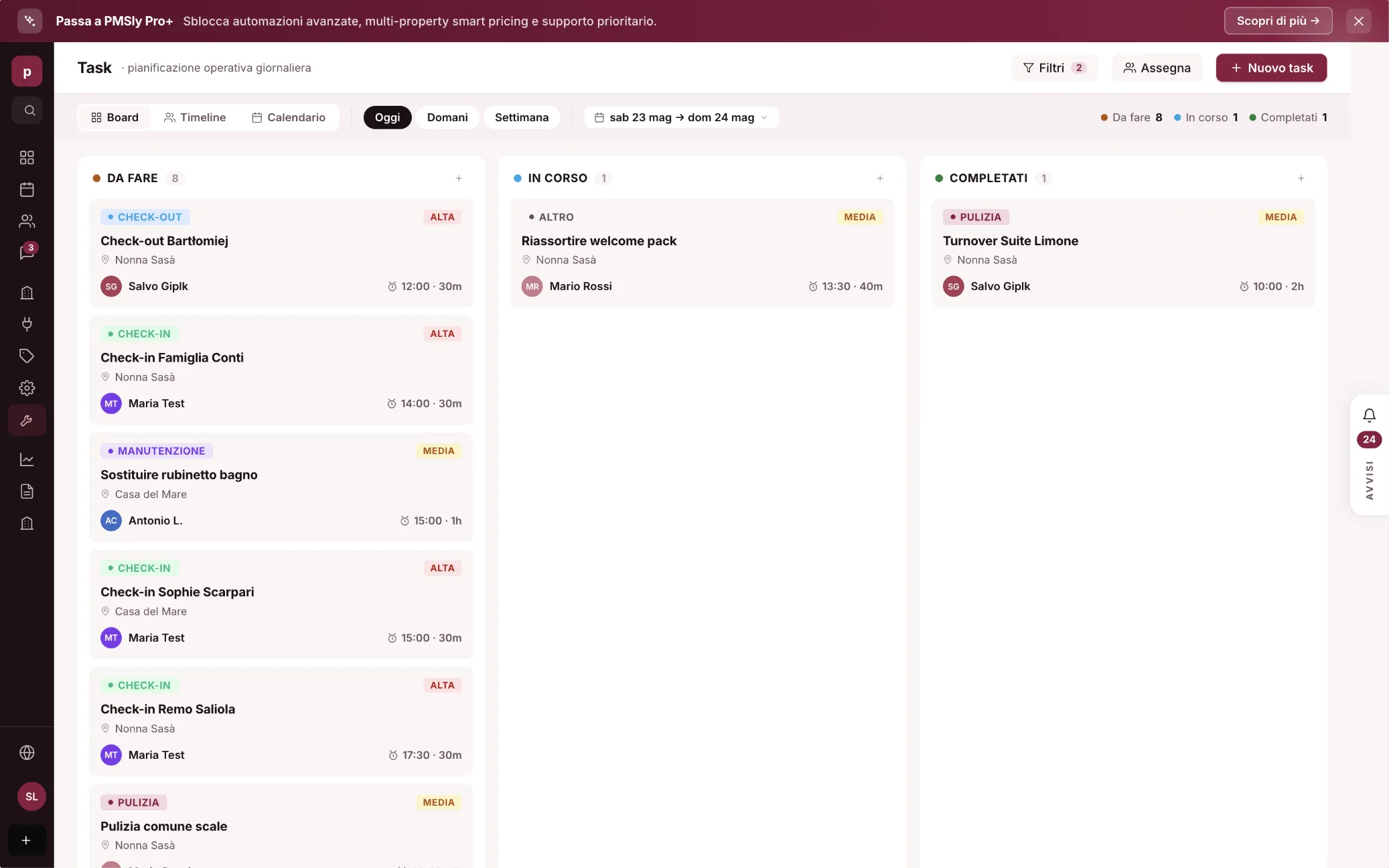
Field staff need a focused mobile interface; managers need portfolio-wide control, exception handling and a reliable audit trail.
Generate or suggest work from departures, arrivals, gaps and manual blocks.
Show only the relevant properties, times, access details, priority and instructions.
Reuse a standard while allowing unit-specific rooms, amenities and setup.
Attach evidence, damage and missing items to the property and task with time and author.
Distinguish assigned, accepted, in progress, blocked, complete and verified.
Do not expose guest data, owner financials or master access that staff does not need.
Turn missing stock and faults into accountable follow-up rather than free-text notes.
Alert the right person when a deadline or next check-in is at risk.
Chat, PMS tasks, housekeeping software or a cleaner marketplace?
These options are not interchangeable. The right choice depends on whether you need internal coordination, deep housekeeping controls or access to external service providers.
Fast for exceptions but weak for ownership, structured checklists, search and readiness reporting.
Best when reservation context and a readable turnover state matter more than specialist workforce features.
Useful for complex teams, time tracking, quality controls, inventory and service-company workflows.
Helps source external providers; it does not automatically solve internal standards or PMS data flow.
Test the situations that make the normal checklist fail.
A demo should include operational edge cases. The system earns its value when the plan changes.
- Same-day turnover with an early-arrival request.
- Cleaner declines or fails to accept the assignment.
- Damage is found after checkout and requires manager approval.
- Linen or consumables are missing across several units.
- A maintenance fault blocks readiness after cleaning is complete.
- The next reservation changes property or dates after tasks were created.
Checklist for choosing vacation-rental cleaning software.
Ask the supplier to run one same-day turnover on a phone and show what both the worker and manager see.
How do cancellations, date changes, back-to-back stays and manual blocks update tasks?
Can a collaborator accept, block and complete work without training on the full PMS?
Who can mark a property ready, and can evidence or an inspection be required?
What happens with poor connectivity, missed alerts or an unaccepted task?
Can managers filter risk by date, area, team, property and next arrival?
Can task, photo and issue history be retrieved when changing software?
How PMSLY is approaching cleaning and field operations.
PMSLY is in pre-launch. The direction is to connect departures, guest reports and property records to tasks with ownership, checklist and visible state. The staff workflow, automations and evidence rules still require validation with real teams.
Calendar context
Turnover can use the property, departure and next arrival without retyping them.
Guest issue to task
A useful report can become accountable work linked to the stay.
Property history
Recurring faults and operating notes remain attached to the correct unit.
Frequently asked questions
What is vacation-rental cleaning software?
It schedules and tracks turnover work by property, date and assignee, usually with mobile checklists, photos, issues and readiness status.
Is it software for cleaning companies?
Some products serve service companies; others are PMS task modules for hosts and property managers. Verify which workforce, billing and quality-control depth you need.
Can it manage maintenance too?
Yes if the task model supports distinct categories, ownership, priority, evidence and follow-up rather than treating every issue as part of cleaning.
Does a small portfolio need it?
It becomes useful as soon as several people share work or chat no longer provides a trustworthy view of readiness.
Should cleaners see guest data?
Only the minimum needed for the task. Good role controls should hide personal, financial and access information that a collaborator does not require.
Is PMSLY cleaning software already live?
No. PMSLY is in pre-launch and the field workflow is being designed for beta validation.